

A stack held together with glue
An alerting tool, a chat thread, a doc template, a status page. You stitch them together with a process doc, and it comes apart in the heat of the moment.
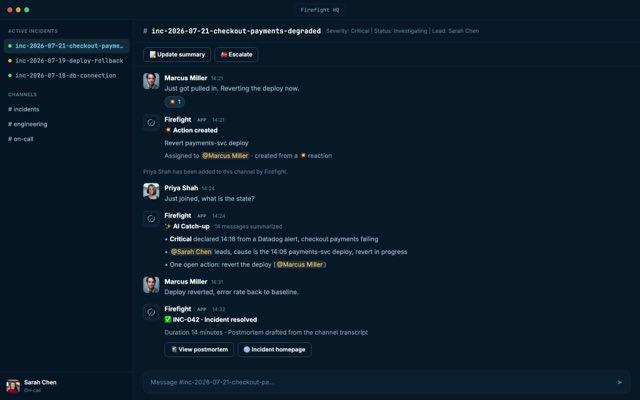
Open-source incident management for Slack. One command opens the channel, pulls in the right people, and captures everything as it happens. When it is over, the postmortem is already drafted.
Sign in with Slack14 days free, then $99 a month per workspace. Nobody on the team needs a seat.
Nothing is held back for a paid tier. Read the code, change it, and run your own version.
Let us host it, with patches and upgrades handled for you. Or run the same platform on your own servers.
$99 a month per workspace, with $25 of AI included every month. Nobody on the team needs a seat.
A versioned REST API, outbound webhooks, and an MCP server your AI agents can act through.
Your team already lives in Slack.
Incidents come with enough pressure. The process should not add more.
An alerting tool, a chat thread, a doc template, a status page. You stitch them together with a process doc, and it comes apart in the heat of the moment.
Opening the channel, finding the right people, posting the first update. By the time everyone is in the room, the incident has had a head start.
Critical details are trapped in DMs, threads, and dashboards. Anyone joining late has to wade through hundreds of messages to learn what everyone else already knows.
Someone still has to rebuild the timeline, chase the follow-ups, and write the postmortem, usually after hours. So it gets skipped, and the same incident comes back two months later.
FireFight connects your tools, teams, and timelines so every incident is captured, automated, and resolved without leaving your workflow.
Slack-native
Integrations
Postmortem
Catalogue
The channel runs the response. The dashboard holds the full record, and every change made in either one shows in the other.
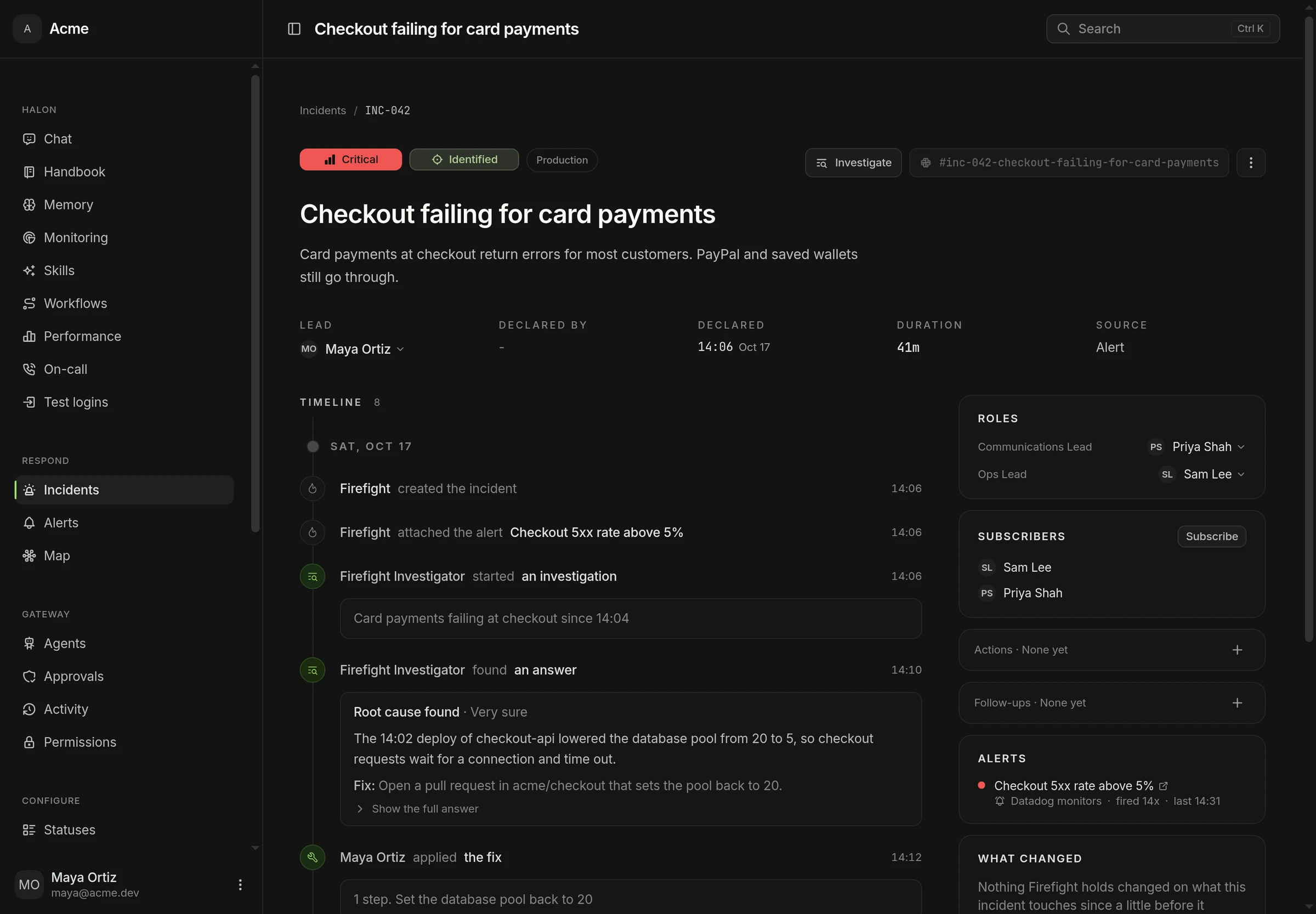
Support, leadership or anyone curious can watch the incident unfold on its page. Every update, role change and step Halon takes shows up the moment it happens.
Declare, post an update, assign roles and resolve with the forms your workspace configured, from either surface.
Status, severity, roles, the timeline, action items, alerts, runbooks and the postmortem, on one page per incident.
Halon is the open-source AI SRE. It investigates production incidents, proves the root cause, and ships the fix.
It reads the metrics, logs and errors to find when the trouble really began, then every deploy and merge just before it, and ranks the suspects.
Each run gets a sandbox with every commit of your repositories, so it can check that a method exists before it blames the data.
Each finding is tested against the evidence it cites before it posts. Any claim that evidence does not show is removed.
Ask Halon in any channel, even before anyone declares an incident, or press Investigate on one. Every step shows in Slack as it runs.
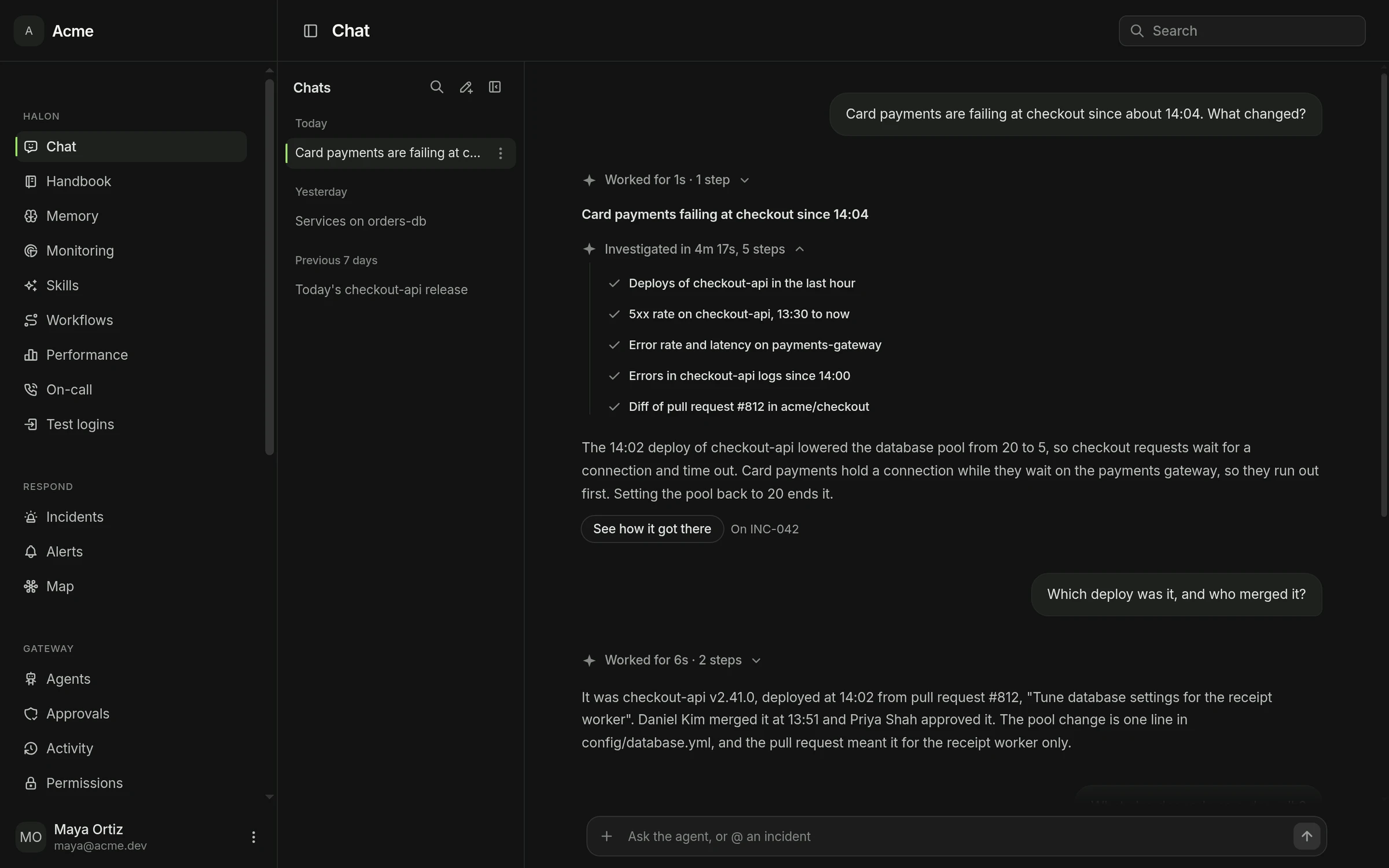
What Halon knows
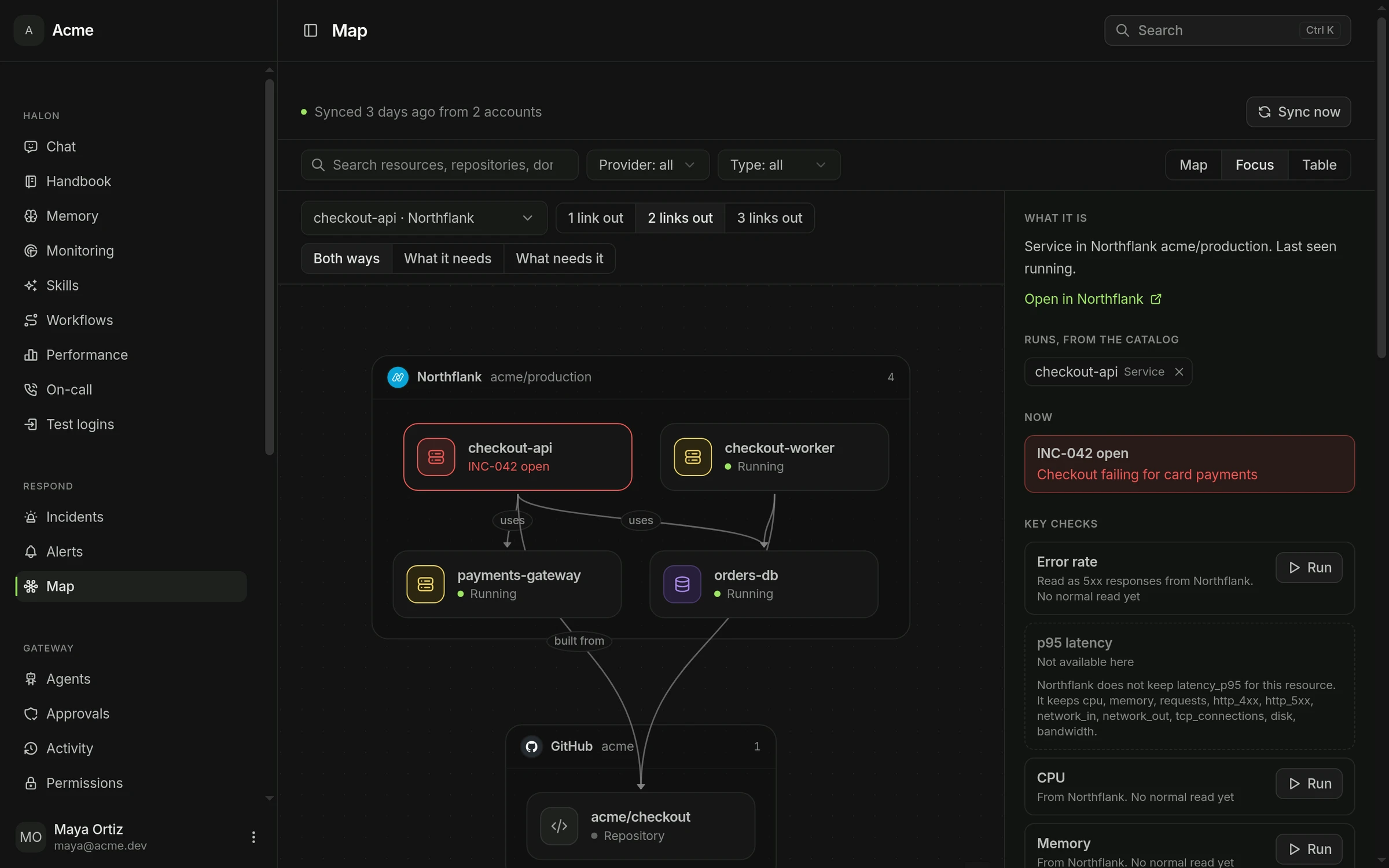
Firefight maps your clouds, services, databases and code on its own, and keeps it current. When something fails, you see at a glance what depends on it and who owns it.
Monitoring tools do not send one clean alert. They send the same one five times, then four hundred at once at 3am. FireFight sorts that out before anyone is notified.
However many times your monitoring resends the same alert, your team sees one and deals with one.
An alert that clears and comes straight back is still one problem. Nobody is notified twice for it.
When related alerts fire at once they land in one incident, with one channel and one timeline. Not forty channels with nobody in charge.
A misconfigured monitor firing nonstop is held at the door. The alert that matters still gets through.
Agents read the same incident record a responder sees, over MCP and the REST API. Grant access capability by capability. Nothing runs unless you allowed it, and every attempt is recorded. When an answer lives in Datadog, Grafana, Sentry or your database, FireFight asks for it there. It is not another place your logs, metrics and traces have to live.
Works with
 Claude Code
  Codex
Codex  Cursor Claude.ai
 What they can reach
Firefight discovers what each tool can do. Switch off any you do not want. Changes still need a grant.


Code


Telemetry and errors


Issues and knowledge


Databases
 Anything else that speaks MCP connects the same way, with no code from us
The process lives in the tool, not in one person's head.
A new joiner can run their first incident on day one.
Setup takes under 5 minutes
Read exactly how Firefight handles your alerts, what Halon can do and what it keeps. Run it on your own servers, or let us host it.
 Star on GitHub
If your question is not here, the answer is probably in the docs, and if it is not, we reply to every message.
No. There is one plan, $99 a month per workspace at the early adopter price, and it covers your whole team. Everyone can declare incidents, take roles, post updates, and ask Halon without changing what you pay. It includes $25 of AI every month, and you can top up or bring your own AI key.
See pricingThe whole platform is AGPL-3.0. There is no separate paid edition of the source and no feature held back for the hosted version. If you self-host, you are running the same thing we run.
Sign in, install the Slack app, declare your first incident. There is nothing to configure beforehand, because statuses, severities, roles, and the incident form all ship with working defaults you can change whenever you want.
It keeps a running summary of the channel, so anyone joining late can run /ff catchup and be current in a few seconds. Mention it and it answers questions about the incident from that incident’s own record. When the incident closes it drafts the postmortem from the timeline and the discussion, and it will rewrite any passage of that draft when you tell it how.
No. We do not use your data to train AI models, and we do not use any provider or setting that would allow anyone else to. FireFight works one incident at a time, from that incident’s own channel and timeline, and nothing else in your workspace is touched. Known credential formats are stripped before anything is saved, and everything saved is encrypted. Self-host and none of it leaves your own infrastructure.
What is stored, what is redacted, and what reaches a modelOnly what you have explicitly granted. Every ability is given to a named agent for a named environment, nothing is on by default, and you can take any of it back at any time. Anything high risk waits for a person to approve it. Every attempt is recorded whether it was allowed or refused, so you can always see what an agent did and what it was stopped from doing.
How permissions, approvals and the activity record workYour team sees one alert and one incident. An alert that clears and comes back is still that one alert, and a burst of related alerts becomes one incident with one channel. A monitor stuck firing nonstop is held back so a real alert still gets through.
How alerts are grouped and deduplicatedFireFight connects to GitHub, GitLab, Datadog, Grafana, New Relic, Sentry, Linear, Notion, Confluence, and Postgres on Neon, Supabase, or PlanetScale. Anything else that speaks MCP can be connected directly, and outbound webhooks plus a versioned REST API cover whatever is left.
You add a card when you start the trial, and it is first charged when the trial ends, unless you cancel before then. If that payment does not go through, the workspace pauses until an admin updates the card, and everything you already have stays exactly where it is.
Cancel under Settings, Billing at any time. There is no contract and no cancellation fee, and the workspace keeps working until the end of the period already paid for. After that your data is kept for 90 days in case you come back, then permanently deleted. If you would rather keep running FireFight without us, self-hosting is the same software and free.
Install FireFight in your Slack today. Setup takes five minutes.
Sign in with Slack14 days free, cancel whenever you like. Or run it on your own servers.
Get notified when something ships