AI SRE Open source Works in Slack

Meet Halon The open-source AI SRE

Halon is the open-source AI SRE. It investigates production incidents, proves the root cause, and ships the fix.

In every workspace, with $25 of AI included each month. Or bring your own AI key.

From the first alert to the fix, in the channel

Ask Halon in the incident channel, or press Investigate on the incident. You see every step it takes, the evidence behind every answer, and nothing risky happens without a person.

Investigates

Several checks at once, live in the thread. Halon starts from the alert and checks logs, deploys and code side by side. You watch each step as it happens.

  • Starts from the signal
  • Several checks at once
  • Reads the code that was running
  • Steer it from the thread

Answers

A confidence level on every conclusion. Halon argues against its own answer before posting it, and drops any claim it can't back up.

  • Root cause, likely cause, or none yet
  • A confidence level on each
  • Says what it couldn't check
  • Rate it right, partly right or wrong

Shows its work

Every finding linked to its source. The run view shows each theory, supported or ruled out, with the steps that decided it and links to the pages they came from.

  • Theories supported or ruled out
  • Each claim cites its steps
  • Links back to the source page
  • Every step in the activity log

Fixes

Fixes that ship. One click applies the fix with your access, never more. Code changes arrive as pull requests for your team to review.

  • Code changes as pull requests
  • Changes through your own tools
  • Steps for a person, with Done
  • Undo where a step can be undone

Approvals

Reads never wait. Risky changes ask first. Safe changes just happen, with an Undo. Anything risky asks the right person in Slack before it runs.

  • Never more access than yours
  • Approve or Deny in Slack
  • Says who needs to approve
  • Every call on the record
What Halon knows

Your systems, your owners, your rules, read before every answer

Halon works from the resource map, the catalog, your handbook, confirmed memory, every past incident and your connected tools. Connections keep it current, and your team decides what it keeps.

  • Resource map Read from connections
  • Catalog Kept by your team
  • Handbook Approved by your team
  • Memory Confirmed by your team
  • Incident history Recorded by FireFight
  • Connected tools Read live
How Halon's context stays current
In the dashboard

Every investigation, open to inspect

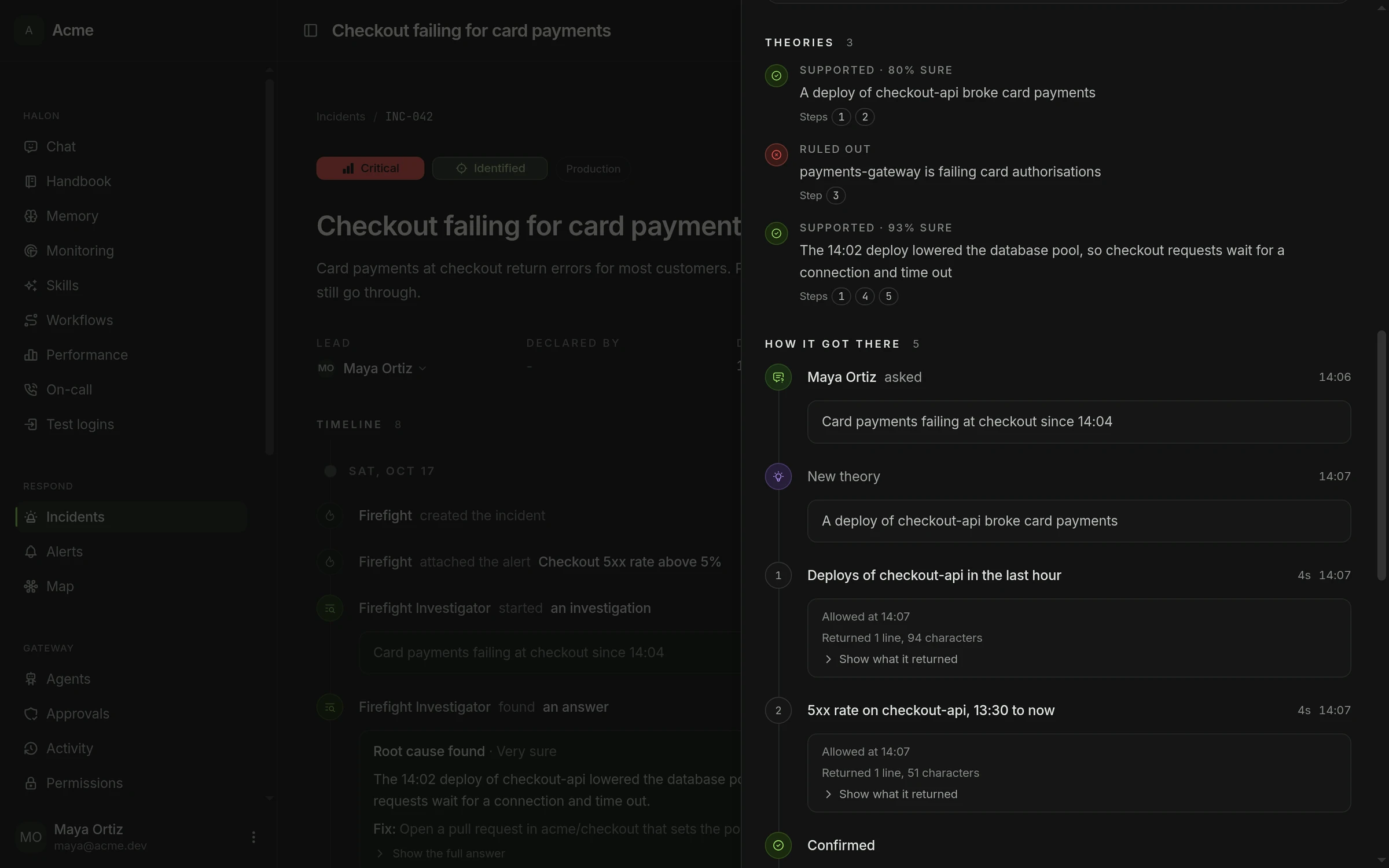
Each run shows the theories Halon tested, supported or ruled out, the steps that decided them and what every tool returned.

A Halon investigation of the checkout incident, open beside the incident page. The theory that the 14:02 deploy lowered the database pool is supported at 93%, the one about payments-gateway is ruled out, and each cites the numbered steps that decided it.

It learns your setup, and your team keeps it right

Every incident leaves Halon better informed. Your team says which lessons are right, the handbook sets the rules, and Halon follows a run, a build or a deploy to the end for you.

Memory

Lessons your team confirms

When an incident ends, Halon shares what it learned and your team says which lessons are right. A lesson is a starting point, and live data always wins.

Handbook

How your team works, written down

Write down how you release, what counts as production and who directs Halon in an incident. Halon follows it every time. When what it sees says otherwise, it suggests an edit, and nothing changes until your team agrees.

Watches

It follows up, so you do not have to

Ask Halon to tell you when a run, a build or a deploy finishes, or to keep checking until a fix holds. You hear one line when something happens, and it changes nothing while it watches.

Safe by default, and every call on the record

Reads never wait, safe changes just happen, and anything risky asks the right person. Your keys stay with Firefight, and every call lands in the activity log.

  1. Your tools

    The cloud, logs, code and databases you connect, with only the tools you switch on.

    Integrations
  2. Firefight holds the keys

    Your keys are stored encrypted, never logged and never shown back in full.

    AI accounts
  3. Halon works through Firefight

    Every call Halon makes goes through Firefight, with no more access than you gave it.

    AI data handling
  4. Changes ask by risk

    Safe changes just happen. Risky ones ask the right person first.

    Changes without asking
  5. Code fixes in a sandbox

    A fix is written in a throwaway sandbox that holds no keys, and arrives as a pull request.

    Investigations
  6. Everything on the record

    Every read and every change is in the activity log, with who Halon was working for.

    Activity

Run Halon on your own key, or on ours

Add your model provider's key and Halon's AI costs go to that account. Without one, Halon runs on Firefight's AI, which every hosted workspace gets each month.

Your own AI account

Bring the key you already pay for

Add one or more accounts, in the order Halon should try them. If one fails, the next takes over and you are told.

  • Anthropic
  • OpenAI
  • Google Gemini
  • Amazon Bedrock
  • Google Vertex AI
  • Azure AI Foundry
  • OpenRouter
  • DeepSeek
  • Mistral
  • xAI
AI accounts

Firefight's AI

Included with every hosted workspace

On Firefight's cloud your plan includes $25 of AI each month, the trial too. Halon spends it once none of your own accounts can pay. Buy credits when you need more, and they never expire. On your own servers, Halon uses the AI keys your server is set up with.

$25 Of AI every month, on every hosted workspace
Pricing

What teams ask before they let an AI in

Every answer here links to the docs page with the detail, and if yours is not here, we reply to every message.

  • What is Halon?

    Halon is the open-source AI SRE. It investigates production incidents, proves the root cause, and ships the fix. It works in Slack and in the dashboard, from your resource map, catalog, handbook, memory, incident history and connected tools, and every fact it states links to its source.

    Read about Halon
  • How do I ask Halon something?

    Ask in Slack, in an incident channel or by mentioning Firefight, or chat with Halon in the dashboard. Your own AI agents can ask it too.

    Starting an investigation
  • Does Halon change things on its own?

    Only what you allow. In a chat Halon has exactly the permissions of the person who asked. Safe changes, such as adding a label or restarting a service that runs several copies, just happen. Anything risky asks first, and a change to access or keys always needs a person. When an alert wakes Halon at night, it fixes something on its own only under rules your team agreed in advance.

    What Halon can do
  • How do I know an answer is right?

    Every answer ships with a confidence level, the facts behind it and the gaps in coverage. Every claim cites the steps it rests on, and a result from a connected tool links back to its page. Your team rates each answer right, partly right or wrong, and the next investigation of the same alert starts from that rating.

    How answers hold up
  • Do our keys or secrets reach the AI model?

    No key does. Halon works through Firefight and never holds a credential. Secrets inside anything it reads are hidden before the model sees them, and keys and tokens posted in a channel are removed before they are stored.

    AI data handling
  • Which AI does Halon run on?

    On your own AI account if you add one, such as Anthropic, OpenAI, Google Gemini, Amazon Bedrock or Azure AI Foundry. Otherwise on Firefight's AI, with $25 of AI included every month on the hosted plan. If you run Firefight yourself, Halon uses the AI keys your server is set up with.

    AI accounts
  • Does Halon remember what it learned?

    Yes, as short lessons your team can confirm, correct or delete. When an incident ends, Halon shares what it learned in the channel. It also follows the handbook your team writes, and suggests an edit when what it sees says otherwise.

    Halon's memory

Put Halon on your next incident

Add Firefight to Slack, connect your tools, and ask Halon on your next incident.

14 days to try every feature, with $25 of AI included. Or run it on your own servers with your own AI keys.