Built for Slack Open source

Incidents in Slack Run the entire incident without leaving Slack

Declare, coordinate, keep everyone informed, track the work, close it out and learn from it, all from the incident channel. Halon works alongside your team the whole way.

14 days free, then $99 a month per workspace. Nobody on the team needs a seat.

How a response runs

Declared, worked and recorded in one channel

Nobody opens another tab during an outage. Everything Firefight does shows up in the channel your team is already reading.

Declare

From alarm to a running response in seconds. Firefight opens a channel for the incident, pins its state with the buttons your team needs, and announces it in your incidents channel.

  • A channel for every incident
  • State and buttons pinned up top
  • Announced in your incidents channel
  • Follow along without joining

Respond

Everyone knows who owns what. Name a lead, fill every role, post updates on a clock, pull in help that has to acknowledge, and turn any message into work with one reaction.

  • Lead and roles in one dialog
  • Reminders when an update is due
  • Escalations that get acknowledged
  • Reactions become action items

Record

The timeline writes itself. Status changes, roles, escalations, pinned messages and alerts land on it as they happen. When the incident ends, Firefight adds what the team worked out in the channel, so the postmortem starts from the facts.

  • Timeline of key events
  • Notes from the conversation
  • Catch-up summaries on demand
  • Postmortem drafted from the record
Commands

Everything, a command away

Every part of the response is one short command, typed in the channel your team is already in.

Declare and coordinate

Open the incident and get the right people on it.

  • /ff new
  • /ff lead
  • /ff roles
  • /ff invite
  • /ff escalate

Communicate

Keep responders and stakeholders on the same page.

  • /ff update
  • /ff status
  • /ff severity
  • /ff catchup

Subscribers get every update by direct message.

Track the work

Capture what needs doing now and what comes after.

  • /ff action
  • /ff followup
  • /ff link
  • /ff duplicate
  • /ff shoutout

React to any message to make it an action item, a follow-up or a shoutout.

Use your runbooks

Bring your playbook into the channel, step by step.

  • /ff runbook

Teammates claim steps and mark them done as they go.

Close and learn

Wrap up cleanly and turn the incident into lessons.

  • /ff resolve
  • /ff cancel
  • /ff reopen
  • /ff timeline
  • /ff postmortem

Halon in the channel

Your AI SRE, working the incident with you.

  • /ff investigate

Mention @Firefight and Halon answers from the incident and your connected tools.

In the dashboard

The same incident, on its own page

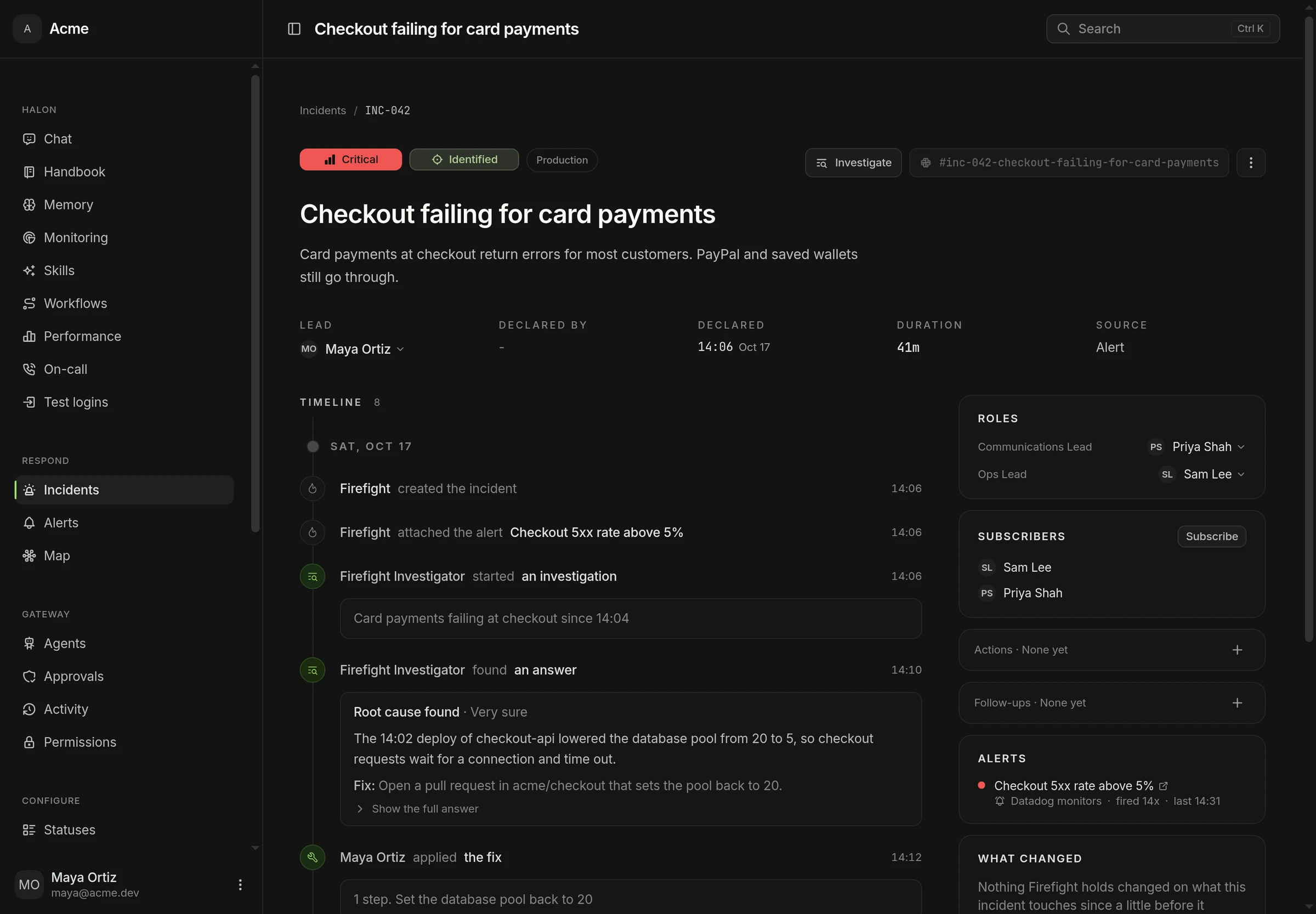
Status, roles, the timeline, action items and the postmortem on one page, live as the channel works. Declare, update, assign roles and resolve with the same dialogs as in Slack.

The FireFight incident page for INC-042, Checkout failing for card payments: critical severity, the lead, roles, subscribers and the alert, with Halon's root cause and the applied fix on the timeline.
Why it works

Less coordinating, more fixing

  • Declare from anywhere

    Start an incident from Slack, the dashboard or the API, or let a routed alert open it for you.

  • Updates that never slip

    Set when the next update is due, and Firefight reminds the lead in the channel when it is.

  • Escalations that get answered

    Pull someone in with a request they have to acknowledge, and Firefight nudges them if they do not.

  • Catch up in seconds

    Anyone joining late gets a summary of the incident so far, without scrolling the channel.

  • Follow without joining

    Stakeholders subscribe and get each update by direct message, while the channel stays focused on the fix.

  • Postmortems that start written

    Firefight drafts the postmortem from the timeline and the conversation, ready for your team to edit.

Documentation

Read how it works

Run your next incident in Slack

Install Firefight in your Slack today. Setup takes five minutes.

Sign in with Slack

14 days free, cancel whenever you like. Or run it on your own servers.